Accenture Off Campus Hiring for an Associate Software Engineer (ASE) | CTC: 4.5 LPA | 2021 batch | Apply now
Hello, Jobseekers!
 |
| Accenture hiring for an Associate Software Engineer (ASE) |
JOB DESCRIPTIONOverviewJoin our team that is developing, designing, and maintaining technologies that improve the way our clients and the world works. Working in challenging and dynamic environments, using their versatility to create and support technology solutions that meet client requirements from analysis to implementation.
What would you do?As an Associate Software Engineer you would largely be involved in: * Design, build, test, assemble, support, and configure applications using business requirements * Understand business drivers that will impact performance and deliver software to those expectations * Bake technology trends into solutions; Participate in the development of automation solutions, new functionality, and technologies and integrate them into existing solutions * Responsible for incident resolution and support extended to customers through voice interaction/email/chat/remote support
What do we need?We would love you to have: * Ability to anticipate and resolve business issues with agility * Multi-disciplinary and versatile with the aptitude to learn and apply new skills faster * Good analytical and problem-solving skills and proficiency in verbal and communication skills * Deliver code, to time and quality expectations and participate in peer reviews * Take ownership of the successful implementation of the solution * Support infrastructure operations and /or manage delivery for IT production systems and services * Flexibility to relocate for project deployment to any part of India and work in 24X7 shifts basis business requirement
Also, the below mentioned will be preferred:
* Basic understanding of ABAP Development on HANA, CDS, AMDP, Performance Analysis * Experience or knowledge in configuration, customization of Salesforce.com applications * Knowledge and development experience of .NET (ASP.NET/ASP.NETMVC)
Registration Process Details
Registration Process
You will receive an email from Accenture with details to register online.
Please fill the registration form carefully & accurately.
Note: You will not be able to make any changes once you have submitted your registration form.
Your registration details will be considered to determine your eligibility.
If you are eligible, you will receive a QR code based admit card.
You will receive an email from Accenture with details to register online.
Please fill the registration form carefully & accurately.
Note: You will not be able to make any changes once you have submitted your registration form.
Your registration details will be considered to determine your eligibility.
If you are eligible, you will receive a QR code based admit card.
Things to do before the registration
Please make sure to have a digital copy of Passport Size Photo ready with you.
Please make sure to have a scanned copy of your PAN Card ready with you.
Please make sure to have the latest copy of your Resume ready with you.
Please make sure to have a digital copy of Passport Size Photo ready with you.
Please make sure to have a scanned copy of your PAN Card ready with you.
Please make sure to have the latest copy of your Resume ready with you.
Detailed Guide to fill the Registration Form
Guide to Fill Job Details
Select Job (If applicable) Click on the check box.
You can also view the Job Description in the link below the Job Name.
Guide to Fill Source Details
How did you find out about this job (If applicable) Choose the option from the drop down as applicable.
In case the right option is not available, then you can choose "OTHERS"
Guide to Fill Personal Details
First Name Mention your name (given name) as per PAN card.
Tool will not consider single alphabet as a name. Middle Name Mention your middle name, if any.
Expand initials in your middle name, if any. Last Name Mention your last name (sur name) as per PAN Card. In the absence of a last name, mention your Father or Mother's name as specified on your PAN card.
Tool will not consider single alphabet as a name. University Registration Number Provide university registration number as per your transcripts.
Tool will not consider any special characters. Email ID Mention your personal email ID which will be used for all communications.
Refrain from using college domain email ID.
No changes will be permitted post submission till onboarding. Mobile Number Enter your personal contact number which will be used for all communications.
No changes will be permitted post submission till onboarding. Alternate Mobile Number Mention an alternate mobile number.
In the absence of an alternate number, you can leave the field blank. PAN Enter your PAN number as per your uploaded PAN card.
Ensure the details entered are accurate as no changes will be permitted post submission. Date of Birth. Select the correct Date/Month/Year (DD/MM/YYYY) from the calendar dropdown. Gender Please select your gender by clicking on the appropriate radio button.
Guide to Fill Educational Details
Education Type You have to choose your education type from the drop down.
Select the option available. Degree Please choose the correct option available in the drop down. Branch Select your branch from the dropdown as per your marksheet. College Please choose the correct option available in the drop down. Year of Passing Please choose the correct option available in the drop down. Aggregate % / CGPA Mention cumulative aggregate percentage or CGPA as per your mark sheet for all available semesters.
Guide to Fill Certification Details
Certification 1 based on Primary/Secondary skill Choose the option available from the drop down as applicable. Certification Status Choose the option available from the drop down as applicable. Certification 2 based on Primary/Secondary skill Choose the option available from the drop down as applicable. Certification Status Choose the option available from the drop down as applicable.
Guide to Fill PWD Details
Do you consider yourself to have a disability Select appropriate value from dropdown. Disability Type Select appropriate value from dropdown. Percentage of Disability Enter a numeric value only. I would need specific assistance to participate in the recruitment process Enter appropriate response. If yes, kindly let us know the assistance which you need to participate in our process Please fill up the assistance details. PWD Certificate Please upload your PWD Certificate
Guide to Fill Preferred Job Location
Preferred Job location 1, 2 & 3 Please choose your preferred location from given dropdown.
Result declaration
Have you completed your Final semester Exam please choose appropiate option from the given dropdown, if your final semester exam is completed (8th semester for B.E/B.tech degree candidates & 4th Semester for MCA candidates). Select your Final Semester exam completion Month, as notified by your Institute (B.E/B.Tech - 8th Sem & MCA -4th Sem) Choose the appropriate option from the drop down. Select your Final Semester Result declaration Month, as notified by your Institute (B.E/B.Tech - 8th Sem & MCA -4th Sem) Choose the appropriate option from the drop down.
Assessment Time Details
Your Preferred Assessment Time slot Please choose your prefered assessment time slot from the given dropdown, we will notify you about your assessment date over a separate mail.
Guide to Fill Other Details
Gap in Education Select from the dropdown in case you have more than a year gap (in a consecutive timeline) in your education from 10th standard till graduation (B.E/ B.Tech). Reason for Gap in Education Select appropriate reasons from the drop down if you have more than 1 year of gap in your education. Have your worked with Accenture before (Full time only)? Select option from the dropdown if you have worked with Accenture as a full-time employee (barring internship opportunities). Please enter your Accenture employee ID in the given box Standing Backlog Select option from the dropdown if you have any active backlog or awaiting your results. Have you appeared for an assessment and/or interview process for Accenture in the last 6 months (do not consider current registration process) Select option from the dropdown if you have applied for a job opportunity with Accenture. Are you an Indian citizen? Select option from the dropdown on your nationality. If No, please specify your country name Mention your country name if you are not an Indian citizen. Do you have a valid work permit Provide inputs by selecting option for availability of work permit.
Guide to Upload Attachments
Resume Upload your resume in any one of the following formats .doc / .docx/ .pdf within a file size of 1 MB. Passport Size Photograph Upload your passport size colored photo no older than 2 months within a file size of 3MB.
Your face should be bright and clearly visible.
There should be no one else in the photo.
Refrain from attaching selfies or cropped images.
Please upload a photo with a plain colour background (preferably White/Blue/Red).
Make sure that the photo is not upside down.
Passport Size Photo Examples. Upload College photo ID Upload your college ID proof document here ( supported file sixe is max 3MB) Government ID Type Select the option PAN card from the drop down and proceed to upload. Government ID Card Upload your colored PAN card copy within a file size of 3 MB.
Please make sure to CROP & UPLOAD only the PAN Card image, if you have an ePAN Card
You can upload a minor PAN card . Click on "SUBMIT ANYWAYS" in case of system warning because of your photo mismatch.
If your name is spelt incorrectly in your PAN card. You can proceed to upload by clicking on "SUBMIT ANYWAYS" even if you are getting system warning for your name mismatch.
Upload the full PAN card image, without any background.
Do NOT upload a poor quality photocopy.
Do NOT upload a copy with the glare of camera flash.
Do NOT upload PAN Application Form, or PAN Card Issued to you as a minor, or Parent's/Guardian's PAN Card.
The PAN number that is updated in the personal details section should match with your uploaded PAN card, without which the tool will not allow you to submit your application.
Govt. ID Card Examples
Guide to Declaration & Consent
Declaration Go through the declaration and consent section in detail.
Agree to the given terms and condition for each section.
Guide to Submit
Captcha Please complete the captcha verification before submitting. Submit Once you click the submit button, you will see a pop up on your screen asking you to review the details you submitted.
Double check the accuracy of the information provided and confirm your application by clicking on submit button.
Guide to Errors & Warnings
Mandatory fields You will get an error message if you have not filled all the mandatory fields.
Please make sure to fill all the mandatory fields. Upload Attachments You will get an error message if you upload the attachments in the invalid format or size.
Please make sure to upload the attachments in the allowed format and size. Invalid Passport Size Photo You will get an error message if your Passport Size Photo is either unclear, or is missing a face, or has too many faces.
Please make sure to upload a clear passport size photo with only your face in the picture.
Guide to Fill Job Details
| Select Job (If applicable) | Click on the check box. You can also view the Job Description in the link below the Job Name. |
Guide to Fill Source Details
| How did you find out about this job (If applicable) | Choose the option from the drop down as applicable. In case the right option is not available, then you can choose "OTHERS" |
Guide to Fill Personal Details
| First Name | Mention your name (given name) as per PAN card. Tool will not consider single alphabet as a name. |
| Middle Name | Mention your middle name, if any. Expand initials in your middle name, if any. |
| Last Name | Mention your last name (sur name) as per PAN Card. In the absence of a last name, mention your Father or Mother's name as specified on your PAN card. Tool will not consider single alphabet as a name. |
| University Registration Number | Provide university registration number as per your transcripts. Tool will not consider any special characters. |
| Email ID | Mention your personal email ID which will be used for all communications. Refrain from using college domain email ID. No changes will be permitted post submission till onboarding. |
| Mobile Number | Enter your personal contact number which will be used for all communications. No changes will be permitted post submission till onboarding. |
| Alternate Mobile Number | Mention an alternate mobile number. In the absence of an alternate number, you can leave the field blank. |
| PAN | Enter your PAN number as per your uploaded PAN card. Ensure the details entered are accurate as no changes will be permitted post submission. |
| Date of Birth. | Select the correct Date/Month/Year (DD/MM/YYYY) from the calendar dropdown. |
| Gender | Please select your gender by clicking on the appropriate radio button. |
Guide to Fill Educational Details
| Education Type | You have to choose your education type from the drop down. Select the option available. |
| Degree | Please choose the correct option available in the drop down. |
| Branch | Select your branch from the dropdown as per your marksheet. |
| College | Please choose the correct option available in the drop down. |
| Year of Passing | Please choose the correct option available in the drop down. |
| Aggregate % / CGPA | Mention cumulative aggregate percentage or CGPA as per your mark sheet for all available semesters. |
Guide to Fill Certification Details
| Certification 1 based on Primary/Secondary skill | Choose the option available from the drop down as applicable. |
| Certification Status | Choose the option available from the drop down as applicable. |
| Certification 2 based on Primary/Secondary skill | Choose the option available from the drop down as applicable. |
| Certification Status | Choose the option available from the drop down as applicable. |
Guide to Fill PWD Details
| Do you consider yourself to have a disability | Select appropriate value from dropdown. |
| Disability Type | Select appropriate value from dropdown. |
| Percentage of Disability | Enter a numeric value only. |
| I would need specific assistance to participate in the recruitment process | Enter appropriate response. |
| If yes, kindly let us know the assistance which you need to participate in our process | Please fill up the assistance details. |
| PWD Certificate | Please upload your PWD Certificate |
Guide to Fill Preferred Job Location
| Preferred Job location 1, 2 & 3 | Please choose your preferred location from given dropdown. |
Result declaration
| Have you completed your Final semester Exam | please choose appropiate option from the given dropdown, if your final semester exam is completed (8th semester for B.E/B.tech degree candidates & 4th Semester for MCA candidates). |
| Select your Final Semester exam completion Month, as notified by your Institute (B.E/B.Tech - 8th Sem & MCA -4th Sem) | Choose the appropriate option from the drop down. |
| Select your Final Semester Result declaration Month, as notified by your Institute (B.E/B.Tech - 8th Sem & MCA -4th Sem) | Choose the appropriate option from the drop down. |
Assessment Time Details
| Your Preferred Assessment Time slot | Please choose your prefered assessment time slot from the given dropdown, we will notify you about your assessment date over a separate mail. |
Guide to Fill Other Details
| Gap in Education | Select from the dropdown in case you have more than a year gap (in a consecutive timeline) in your education from 10th standard till graduation (B.E/ B.Tech). |
| Reason for Gap in Education | Select appropriate reasons from the drop down if you have more than 1 year of gap in your education. |
| Have your worked with Accenture before (Full time only)? | Select option from the dropdown if you have worked with Accenture as a full-time employee (barring internship opportunities). Please enter your Accenture employee ID in the given box |
| Standing Backlog | Select option from the dropdown if you have any active backlog or awaiting your results. |
| Have you appeared for an assessment and/or interview process for Accenture in the last 6 months (do not consider current registration process) | Select option from the dropdown if you have applied for a job opportunity with Accenture. |
| Are you an Indian citizen? | Select option from the dropdown on your nationality. |
| If No, please specify your country name | Mention your country name if you are not an Indian citizen. |
| Do you have a valid work permit | Provide inputs by selecting option for availability of work permit. |
Guide to Upload Attachments
| Resume | Upload your resume in any one of the following formats .doc / .docx/ .pdf within a file size of 1 MB. |
| Passport Size Photograph | Upload your passport size colored photo no older than 2 months within a file size of 3MB. Your face should be bright and clearly visible. There should be no one else in the photo. Refrain from attaching selfies or cropped images. Please upload a photo with a plain colour background (preferably White/Blue/Red). Make sure that the photo is not upside down. Passport Size Photo Examples. |
| Upload College photo ID | Upload your college ID proof document here ( supported file sixe is max 3MB) |
| Government ID Type | Select the option PAN card from the drop down and proceed to upload. |
| Government ID Card | Upload your colored PAN card copy within a file size of 3 MB. Please make sure to CROP & UPLOAD only the PAN Card image, if you have an ePAN Card You can upload a minor PAN card . Click on "SUBMIT ANYWAYS" in case of system warning because of your photo mismatch. If your name is spelt incorrectly in your PAN card. You can proceed to upload by clicking on "SUBMIT ANYWAYS" even if you are getting system warning for your name mismatch. Upload the full PAN card image, without any background. Do NOT upload a poor quality photocopy. Do NOT upload a copy with the glare of camera flash. Do NOT upload PAN Application Form, or PAN Card Issued to you as a minor, or Parent's/Guardian's PAN Card. The PAN number that is updated in the personal details section should match with your uploaded PAN card, without which the tool will not allow you to submit your application. Govt. ID Card Examples |
Guide to Declaration & Consent
| Declaration | Go through the declaration and consent section in detail. Agree to the given terms and condition for each section. |
Guide to Submit
| Captcha | Please complete the captcha verification before submitting. |
| Submit | Once you click the submit button, you will see a pop up on your screen asking you to review the details you submitted. Double check the accuracy of the information provided and confirm your application by clicking on submit button. |
Guide to Errors & Warnings
| Mandatory fields | You will get an error message if you have not filled all the mandatory fields. Please make sure to fill all the mandatory fields. |
| Upload Attachments | You will get an error message if you upload the attachments in the invalid format or size. Please make sure to upload the attachments in the allowed format and size. |
| Invalid Passport Size Photo | You will get an error message if your Passport Size Photo is either unclear, or is missing a face, or has too many faces. Please make sure to upload a clear passport size photo with only your face in the picture. |
Eligibility Criteria
Degrees & Branches Full time program in B.E./ B. Tech (All streams / branches) or MCA. Year of passing Graduates from 2021. Academic Performance Aggregate of 65% / 6.5 CGPA during application process (till VI Semester for BE / B.Tech and II Semester for MCA) and across all semesters at the time of Onboarding. Backlogs No active backlogs both during application (till VI semester for BE/ B.Tech & II Semester for MCA) and at the time of Onboarding). Gap in Education Maximum 1-year gap in education (post 10th standard till completion of graduation). Applied for Accenture The candidate should not have appeared for the Accenture Recruitment assessment/interview process in the last six months Work Permit Should be an Indian Citizen. Bhutan & Nepal nationals can work in India without a need for obtaining a visa to work. All other foreign nationals require work visa or an OCI / PIO card to work in India. Bhutan & Nepal nationals would also need to submit a Citizenship certificate or a Govt. ID Card in the absence of other documents (PIO/OCI/Work permit/passport).
| Degrees & Branches | Full time program in B.E./ B. Tech (All streams / branches) or MCA. |
| Year of passing | Graduates from 2021. |
| Academic Performance | Aggregate of 65% / 6.5 CGPA during application process (till VI Semester for BE / B.Tech and II Semester for MCA) and across all semesters at the time of Onboarding. |
| Backlogs | No active backlogs both during application (till VI semester for BE/ B.Tech & II Semester for MCA) and at the time of Onboarding). |
| Gap in Education | Maximum 1-year gap in education (post 10th standard till completion of graduation). |
| Applied for Accenture | The candidate should not have appeared for the Accenture Recruitment assessment/interview process in the last six months |
| Work Permit | Should be an Indian Citizen. Bhutan & Nepal nationals can work in India without a need for obtaining a visa to work. All other foreign nationals require work visa or an OCI / PIO card to work in India. Bhutan & Nepal nationals would also need to submit a Citizenship certificate or a Govt. ID Card in the absence of other documents (PIO/OCI/Work permit/passport). |
Assessment Details
Assessment Process
If you are eligible, you will receive an email invitation to attend online assessments
The assessment is scheduled in two stages, and must be completed within the scheduled time
Mock Assessment
You will get a 20-minute mock/practice assessment
Mock assessment is mandatory, and it will ensure that you have the right hardware, software and internet
This assessment will help you to get an experience of the assessments.
Assessment #1: Cognitive and Technical assessment
You will get 90 minutes to complete this assessment
Cognitive assessment includes 50 questions on:
- English ability
- Analytical reasoning
- Numerical Ability
Technical assessment includes 40 questions on:
- Common Application and MS office
- Pseudocode
- Fundamentals of Networking, Security and Cloud
Cognitive and technical assessment result will be notified within 5-10 minutes post completion. You are advised to remain seated and await result. Coding assessment will commence immediately post result notification
- You are required to meet the section and sub section cut off in our assessment to be considered for further rounds.
- Candidates must participate in coding assessment mandatorily post clearing cognitive and technical assessment
- Candidates who do not clear cognitive and technical assessment or fail to participate in ourassessments the process will end there for their candidature.,
Assessment #2: Coding assessment
The duration of this assessment will be 45 minutes
You will get 2 questions which must be solved using any one of the following languages
- C
- C++
- Dot Net
- Java
- Python
Assessment #3: Communication assessment
The duration of this assessment is approximately 30 minutes
You will receive a separate email with timelines and login details to participate in this assessment
Communication assessment will assess you on the below mentioned parameters
- Sentence Mastery
- Vocabulary
- Fluency
- Pronunciation
If you are eligible, you will receive an email invitation to attend online assessments
The assessment is scheduled in two stages, and must be completed within the scheduled time
Mock Assessment
You will get a 20-minute mock/practice assessment
Mock assessment is mandatory, and it will ensure that you have the right hardware, software and internet
This assessment will help you to get an experience of the assessments.
Assessment #1: Cognitive and Technical assessment
You will get 90 minutes to complete this assessment
Cognitive assessment includes 50 questions on:
- English ability
- Analytical reasoning
- Numerical Ability
Technical assessment includes 40 questions on:
- Common Application and MS office
- Pseudocode
- Fundamentals of Networking, Security and Cloud
Cognitive and technical assessment result will be notified within 5-10 minutes post completion. You are advised to remain seated and await result. Coding assessment will commence immediately post result notification
- You are required to meet the section and sub section cut off in our assessment to be considered for further rounds.
- Candidates must participate in coding assessment mandatorily post clearing cognitive and technical assessment
- Candidates who do not clear cognitive and technical assessment or fail to participate in ourassessments the process will end there for their candidature.,
Assessment #2: Coding assessment
The duration of this assessment will be 45 minutes
You will get 2 questions which must be solved using any one of the following languages
- C
- C++
- Dot Net
- Java
- Python
Assessment #3: Communication assessment
The duration of this assessment is approximately 30 minutes
You will receive a separate email with timelines and login details to participate in this assessment
Communication assessment will assess you on the below mentioned parameters
- Sentence Mastery
- Vocabulary
- Fluency
- Pronunciation
Mock Assessment
System Requirements for Mock Assessment
Machine Laptop/Desktop, DO NOT use Mobile/Tablet. Operating system Only Windows 8 or 10 only Browser Secure Exam Browser is mandatory, Google Chrome Browser version 80+ is mandatory (upto 5 Latest versions considered, No beta versions) VPN/Proxy should be disabled Video & Audio Webcam & Mic is mandatory RAM 4 GB+ RAM Processor i3 5th Generation 2.2Ghz or equivalent/higher Cookies & Popups Cookies need to be enabled
Popups need to be enabled Internet Connection You must have a stable 2MBPS+of Upload & Download speed.
Please try using Broadband. Avoid using unstable 3G/4G Networks.
System Requirements for Mock Assessment
| Machine | Laptop/Desktop, DO NOT use Mobile/Tablet. |
| Operating system | Only Windows 8 or 10 only |
| Browser | Secure Exam Browser is mandatory, Google Chrome Browser version 80+ is mandatory (upto 5 Latest versions considered, No beta versions) VPN/Proxy should be disabled |
| Video & Audio | Webcam & Mic is mandatory |
| RAM | 4 GB+ RAM |
| Processor | i3 5th Generation 2.2Ghz or equivalent/higher |
| Cookies & Popups | Cookies need to be enabled Popups need to be enabled |
| Internet Connection | You must have a stable 2MBPS+of Upload & Download speed. Please try using Broadband. Avoid using unstable 3G/4G Networks. |
Things to do before the Mock Assessment
Prepare your environment
Make sure you are in a quiet room
Make sure that no one else is present in the room
Make sure that your phone is away and on "silent mode"
Make sure that your face is well-lit and clearly visible in the camera
Prepare your hardware
Make sure you have a system with the above mentioned pre-requisite
Make sure you have the Secure Exam Browser installed
Make sure you have Google Chrome Browser version 80+ installed
Make sure that your laptop/desktop is connected to uninterrupted power supply and/or UPS
Make sure that you have a stable 2MBPS+ of Upload & Download speed.
Restart your Modem, WIFI Router, to ensure uninterrupted connectivity
Make sure that your webcam and microphone are active and, in the switch-on mode
Prepare your software
Restart your laptop before the test
Make sure your anti-virus is disabled
Ensure that your operating system is updated
Disable your screensaver, screen auto-lock, and display auto-sleep
Disable all system popups
Enable pop up notifications and cookies on your chrome browser
Prepare your environment
Make sure you are in a quiet room
Make sure that no one else is present in the room
Make sure that your phone is away and on "silent mode"
Make sure that your face is well-lit and clearly visible in the camera
Prepare your hardware
Make sure you have a system with the above mentioned pre-requisite
Make sure you have the Secure Exam Browser installed
Make sure you have Google Chrome Browser version 80+ installed
Make sure that your laptop/desktop is connected to uninterrupted power supply and/or UPS
Make sure that you have a stable 2MBPS+ of Upload & Download speed.
Restart your Modem, WIFI Router, to ensure uninterrupted connectivity
Make sure that your webcam and microphone are active and, in the switch-on mode
Prepare your software
Restart your laptop before the test
Make sure your anti-virus is disabled
Ensure that your operating system is updated
Disable your screensaver, screen auto-lock, and display auto-sleep
Disable all system popups
Enable pop up notifications and cookies on your chrome browser
Cognitive, Technical, and Coding Assessments
System Requirements for Cognitive, Technical, and Coding Assessments
Machine Laptop/Desktop, DO NOT use Mobile/Tablet. Operating system Windows 8 or 10 Browser Secure Exam Browser is mandatory, Google Chrome Browser version 80+ is mandatory (upto 5 Latest versions considered, No beta versions) VPN/Proxy should be disabled Video & Audio Webcam & Mic is mandatory RAM 4 GB+ RAM Processor i3 5th Generation 2.2Ghz or equivalent/higher Cookies & Popups Cookies need to be enabled
Popups need to be enabled Internet Connection You must have a stable 2MBPS+of Upload & Download speed.
Please try using Broadband. Avoid using unstable 3G/4G Networks.
System Requirements for Cognitive, Technical, and Coding Assessments
| Machine | Laptop/Desktop, DO NOT use Mobile/Tablet. |
| Operating system | Windows 8 or 10 |
| Browser | Secure Exam Browser is mandatory, Google Chrome Browser version 80+ is mandatory (upto 5 Latest versions considered, No beta versions) VPN/Proxy should be disabled |
| Video & Audio | Webcam & Mic is mandatory |
| RAM | 4 GB+ RAM |
| Processor | i3 5th Generation 2.2Ghz or equivalent/higher |
| Cookies & Popups | Cookies need to be enabled Popups need to be enabled |
| Internet Connection | You must have a stable 2MBPS+of Upload & Download speed. Please try using Broadband. Avoid using unstable 3G/4G Networks. |
Things to do before the Cognitive, Technical, and Coding Assessments
Prepare your environment
Make sure you are in a quiet room
Make sure that no one else is present in the room
Make sure that your phone is away and on "silent mode"
Make sure that your face is well-lit and clearly visible in the camera
Prepare your hardware
Make sure you have a system with the abovementioned pre-requisite
Make sure you have the Secure Exam Browser installed
Make sure you have Google Chrome Browser version 80+ installed
Make sure that your laptop/desktop is connected to uninterrupted power supply and/or UPS
Make sure that you have a stable 2MBPS+ of Upload & Download speed.
Restart your Modem, WIFI Router, to ensure uninterrupted connectivity
Make sure that your webcam and microphone are active and, in the switch-on mode
Prepare your software
Restart your laptop before the test
Make sure your anti-virus is disabled
Ensure that your operating system is updated
Disable your screensaver, screen auto-lock, and auto-sleep mode
Disable all system popup notifications
Enable pop up notifications and cookies on your chrome browser
Prepare your environment
Make sure you are in a quiet room
Make sure that no one else is present in the room
Make sure that your phone is away and on "silent mode"
Make sure that your face is well-lit and clearly visible in the camera
Prepare your hardware
Make sure you have a system with the abovementioned pre-requisite
Make sure you have the Secure Exam Browser installed
Make sure you have Google Chrome Browser version 80+ installed
Make sure that your laptop/desktop is connected to uninterrupted power supply and/or UPS
Make sure that you have a stable 2MBPS+ of Upload & Download speed.
Restart your Modem, WIFI Router, to ensure uninterrupted connectivity
Make sure that your webcam and microphone are active and, in the switch-on mode
Prepare your software
Restart your laptop before the test
Make sure your anti-virus is disabled
Ensure that your operating system is updated
Disable your screensaver, screen auto-lock, and auto-sleep mode
Disable all system popup notifications
Enable pop up notifications and cookies on your chrome browser
Communication Assessment
System Requirements for Communication Assessment
Machine Laptop/Desktop, DO NOT use Mobile/Tablet. Operating system Only Windows 8 or 10 only Browser Google Chrome Browser version 80+ is mandatory (upto 5 Latest versions considered, No beta versions) VPN/Proxy should be disabled Video & Audio Webcam & Mic is mandatory RAM 4 GB+ RAM Processor i3 5th Generation 2.2Ghz or equivalent/higher Cookies & Popups Cookies need to be enabled
Popups need to be enabled Internet Connection You must have a stable 2MBPS+of Upload & Download speed.
Please try using Broadband. Avoid using unstable 3G/4G Networks.
System Requirements for Communication Assessment
| Machine | Laptop/Desktop, DO NOT use Mobile/Tablet. |
| Operating system | Only Windows 8 or 10 only |
| Browser | Google Chrome Browser version 80+ is mandatory (upto 5 Latest versions considered, No beta versions) VPN/Proxy should be disabled |
| Video & Audio | Webcam & Mic is mandatory |
| RAM | 4 GB+ RAM |
| Processor | i3 5th Generation 2.2Ghz or equivalent/higher |
| Cookies & Popups | Cookies need to be enabled Popups need to be enabled |
| Internet Connection | You must have a stable 2MBPS+of Upload & Download speed. Please try using Broadband. Avoid using unstable 3G/4G Networks. |
Things to do before the Communication Assessment
Prepare your environment
Make sure you are in a quiet room
Make sure that no one else is present in the room
Make sure that your phone is away and on "silent mode"
Make sure that your face is well-lit and clearly visible in the camera
Prepare your hardware
Make sure you have a system with the above mentioned pre-requisite
Make sure you have Google Chrome Browser version 80+ installed
Make sure that your laptop/desktop is connected to uninterrupted power supply and/or UPS
Make sure that you have a stable 2MBPS+ of Upload & Download speed.
Restart your Modem, WIFI Router, to ensure uninterrupted connectivity
Make sure that your webcam and microphone are active and, in the switch-on mode
Prepare your software
Restart your laptop before the test
Make sure your anti-virus is disabled
Ensure that your operating system is updated
Disable your screensaver, screen auto-lock, and auto-sleep mode
Disable all system popup notifications
Enable pop up notifications and cookies on your chrome browser
Prepare your environment
Make sure you are in a quiet room
Make sure that no one else is present in the room
Make sure that your phone is away and on "silent mode"
Make sure that your face is well-lit and clearly visible in the camera
Prepare your hardware
Make sure you have a system with the above mentioned pre-requisite
Make sure you have Google Chrome Browser version 80+ installed
Make sure that your laptop/desktop is connected to uninterrupted power supply and/or UPS
Make sure that you have a stable 2MBPS+ of Upload & Download speed.
Restart your Modem, WIFI Router, to ensure uninterrupted connectivity
Make sure that your webcam and microphone are active and, in the switch-on mode
Prepare your software
Restart your laptop before the test
Make sure your anti-virus is disabled
Ensure that your operating system is updated
Disable your screensaver, screen auto-lock, and auto-sleep mode
Disable all system popup notifications
Enable pop up notifications and cookies on your chrome browser
Common issues faced during the test
I get a pop-up asking for "Tenant Alias"
This pop-up is served if the URL is incomplete.
Please avoid copy/pasting the URL, and click the link directly from the email you received.
If you cannot avoid copy/pasting the URL, please copy & paste the full URL.
This pop-up is served if the URL is incomplete.
Please avoid copy/pasting the URL, and click the link directly from the email you received.
If you cannot avoid copy/pasting the URL, please copy & paste the full URL.
I get an error saying "Invalid Username or Password"
This error occurs if you are incorrectly entering the username and/or password.
Please carefully enter the correct username & password.
If you are copy/pasting, please ensure that you have copied the full username/password, and there are no blank spaces in the copied username/password.
This error occurs if you are incorrectly entering the username and/or password.
Please carefully enter the correct username & password.
If you are copy/pasting, please ensure that you have copied the full username/password, and there are no blank spaces in the copied username/password.
I get an error saying "System Clock Out of Sync"
This error occurs if your machine does not have the correct date & time set.
Please set the correct date & time using your operating system settings/preferences.
This error occurs if your machine does not have the correct date & time set.
Please set the correct date & time using your operating system settings/preferences.
I get an error saying "Device not Compatible"
This error occurs if you are using a mobile or a tablet.
Please make sure that you take the test from a laptop or a desktop.
This error occurs if you are using a mobile or a tablet.
Please make sure that you take the test from a laptop or a desktop.
I get an error saying "Too much background noise"
This error occurs if there is too much background noise in your environment. Too much background noise can lead to your test scores being affected, so low background noise is important for your own success.
Please check your hardware
- Please Make sure that you are using a good quality wired headset with microphone for the test. Do not use bluetooth headphones.
- Please avoid using the laptop mic because it captures more background noise
- Please check that your headset/mic is properly connected to the laptop/desktop.
- Please check that your headset/mic is not generating its own static noise
Please check your surroundings
- Please ensure that you do not have too much noise in your room or near your room
- If you are unable to fix the issue immediately, please try taking the test at a later time.
This error occurs if there is too much background noise in your environment. Too much background noise can lead to your test scores being affected, so low background noise is important for your own success.
Please check your hardware
- Please Make sure that you are using a good quality wired headset with microphone for the test. Do not use bluetooth headphones.
- Please avoid using the laptop mic because it captures more background noise
- Please check that your headset/mic is properly connected to the laptop/desktop.
- Please check that your headset/mic is not generating its own static noise
Please check your surroundings
- Please ensure that you do not have too much noise in your room or near your room
- If you are unable to fix the issue immediately, please try taking the test at a later time.
I get an error saying "Your Internet Connection is too slow"
This error occurs if you don't have sufficient upload and download speed
- Please try using the broadband. Please avoid using unstable 3G/4G connections.
- If you are using a broadband, please try restarting your router and modem.
- If you only have a 3G/4G connection, please ensure that 3G/4G signal is strong and stable.
- If your connection is poor, please try arranging for an alternative connection
- If you are unable to fix the issue immediately, please try taking the test at a later time.
This error occurs if you don't have sufficient upload and download speed
- Please try using the broadband. Please avoid using unstable 3G/4G connections.
- If you are using a broadband, please try restarting your router and modem.
- If you only have a 3G/4G connection, please ensure that 3G/4G signal is strong and stable.
- If your connection is poor, please try arranging for an alternative connection
- If you are unable to fix the issue immediately, please try taking the test at a later time.
I get an error saying "Your system is too slow"
This error occurs if your RAM or Processor speed is too slow, and/or if you have too many other applications open.
Please close all other applications, and restart your system. If you still see the error, then please upgrade to a faster machine.
RAM 4 GB or More Processor i3 5th Generation 2.2Ghz or equivalent/higher
This error occurs if your RAM or Processor speed is too slow, and/or if you have too many other applications open.
Please close all other applications, and restart your system. If you still see the error, then please upgrade to a faster machine.
| RAM | 4 GB or More |
| Processor | i3 5th Generation 2.2Ghz or equivalent/higher |
I get an error saying "Browser not compatible"
This error occurs if you are not using Google Chrome version 80 & above.
Please install Google Chrome Browser version 80 & above. No beta versions allowed.
This error occurs if you are not using Google Chrome version 80 & above.
Please install Google Chrome Browser version 80 & above. No beta versions allowed.
I get an error saying "Camera/Microphone not available"
Please make sure that your Webcam & Microphone are connected properly, Also make sure that you allow access to your camera & mic as shown below.
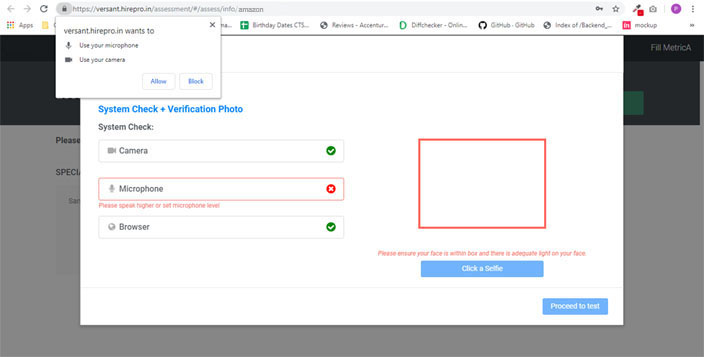
Please make sure that your Webcam & Microphone are connected properly, Also make sure that you allow access to your camera & mic as shown below.
I accidentally blocked access to my Camera and Microphone
Go to: Chrome -> Settings -> Advanced Settings -> Privacy & Security-> Site Settings ->
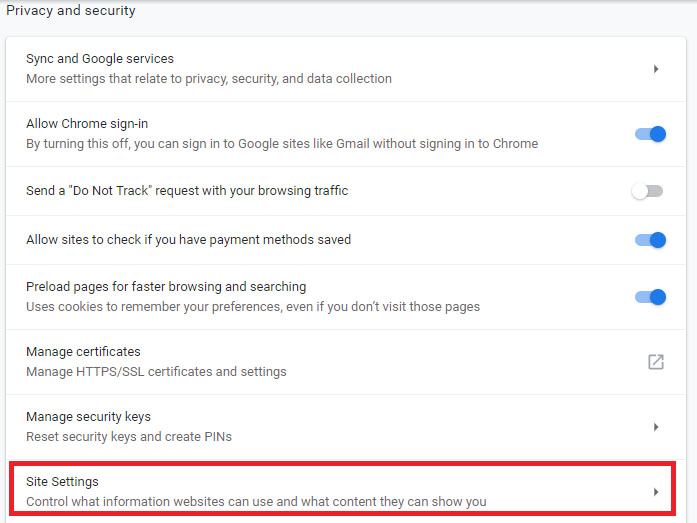
Go to: Chrome -> Settings -> Advanced Settings -> Privacy & Security-> Site Settings ->
To re-allow access to Camera
Please delete the blocked site as shown below:
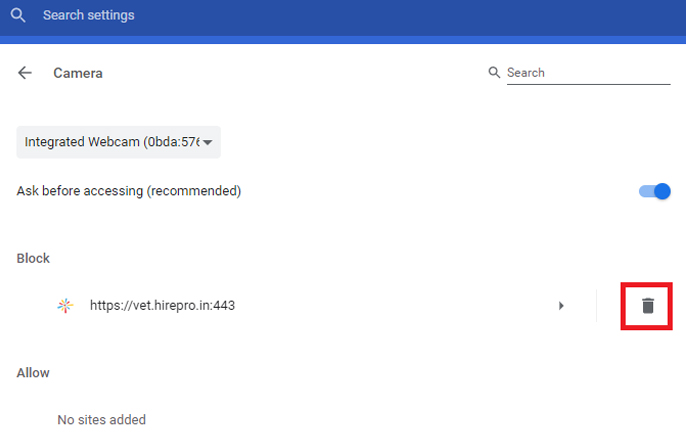
Please delete the blocked site as shown below:
To re-allow access to Microphone
Please delete the blocked site as shown below:
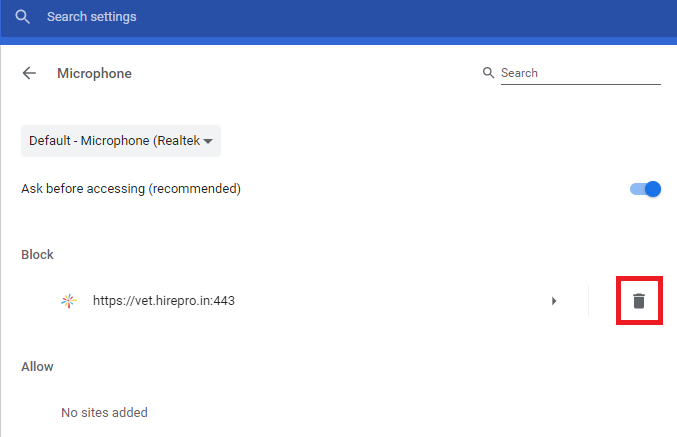
Please delete the blocked site as shown below:
I get an error saying "Problem with Connection"
Check your network connection. This issue occurs when the connection is not appropriate with the bandwidth allocated with the website.
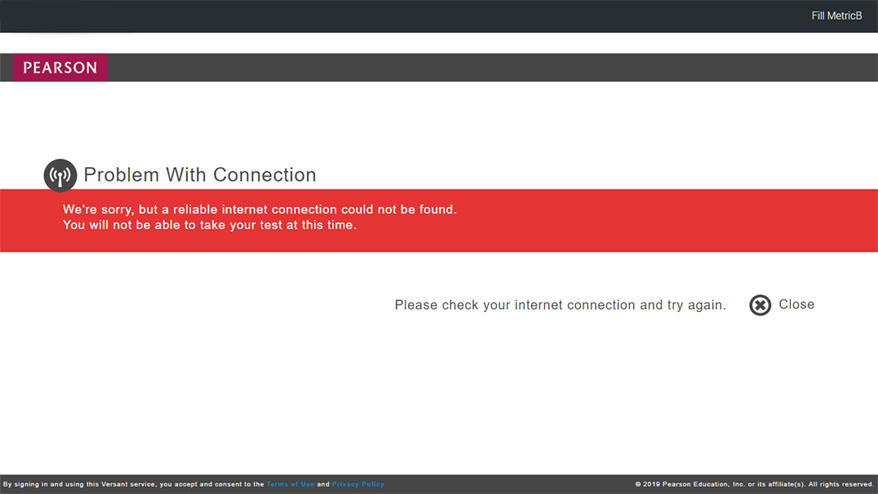
Check your network connection. This issue occurs when the connection is not appropriate with the bandwidth allocated with the website.
I get an error saying "Background Noise Not Ideal"
When any noise from the surrounding is audible, system might prevent you from receiving a score. Please make sure you are in a quiet place while taking the test.
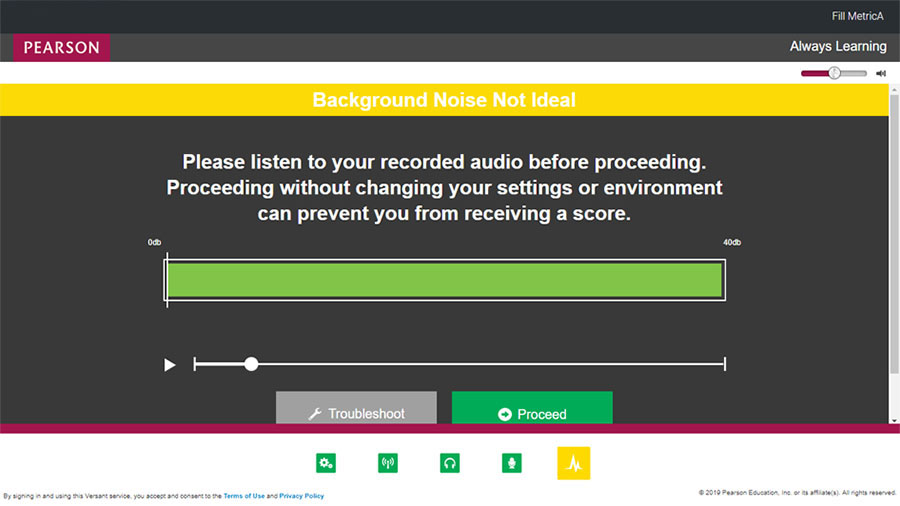
When any noise from the surrounding is audible, system might prevent you from receiving a score. Please make sure you are in a quiet place while taking the test.
I get an error saying "Please make sure you are visible in the camera"
This error occurs if the camera is not able to see your face. Since it is a proctored test, you are required to be in front of camera throughout the test.
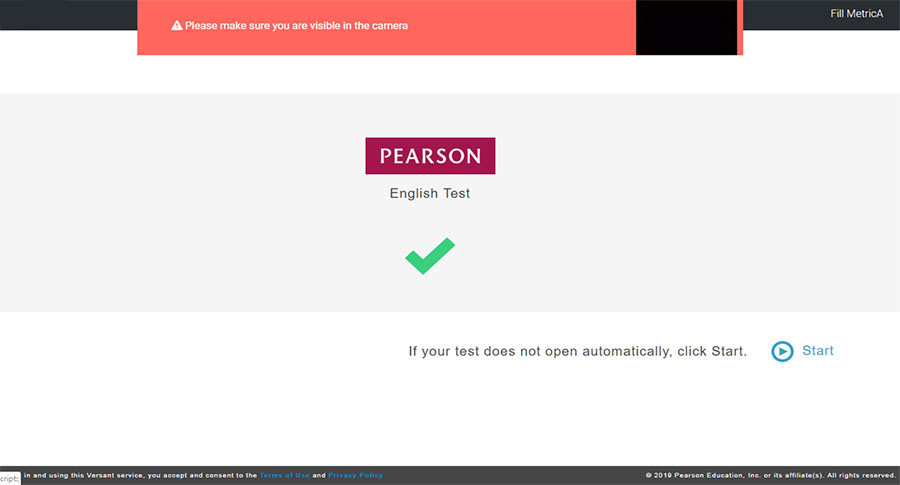
This error occurs if the camera is not able to see your face. Since it is a proctored test, you are required to be in front of camera throughout the test.
I accidentally closed my browser; my system hanged/got shutdown
If this issue happens, please access your test again using the original credentials shared with you.
Note: You MUST complete the test within 24 hours of starting it.
If this issue happens, please access your test again using the original credentials shared with you.
Note: You MUST complete the test within 24 hours of starting it.
How to Apply for Accenture off-campus drive:
How to Apply for Accenture off-campus drive:
Watch Video Before Apply
NOTE: - The candidate should not have appeared for the Accenture Recruitment assessment/interview process in the last six months
NOTE: - The candidate should not have appeared for the Accenture Recruitment assessment/interview process in the last six months
Recent drives Click here
Recent drives Click here
Important Note While Applying for Jobs:- Do read all the instructions and requirements carefully before applying for the job. All the communications from the organization will be on your registered Email ID. Keep checking your mailbox for the next round of details once candidature is shortlisted.
Disclaimer:- Freshers hiring jobs platform is a free Job Sharing platform for all Job seekers. We don’t charge any cost and service fee for any job which is posted on our website, neither we have authorized anyone to do the same. Most of the jobs posted over Freshers hiring jobs are taken from the career pages of the organizations. Jobseekers/Applicants are advised to check all the details when they apply for the job to avoid any inconvenience.
Important Note While Applying for Jobs:- Do read all the instructions and requirements carefully before applying for the job. All the communications from the organization will be on your registered Email ID. Keep checking your mailbox for the next round of details once candidature is shortlisted.
Disclaimer:- Freshers hiring jobs platform is a free Job Sharing platform for all Job seekers. We don’t charge any cost and service fee for any job which is posted on our website, neither we have authorized anyone to do the same. Most of the jobs posted over Freshers hiring jobs are taken from the career pages of the organizations. Jobseekers/Applicants are advised to check all the details when they apply for the job to avoid any inconvenience.
Comments
Post a Comment